One Purchase, Three Layers of Rewards: The Complete MaxWorth Earn Stacking Guide
Card earn rates, Chase and Amex offers, cash-back shopping portals — three layers of rewards that don't conflict, and most of them stack. The hard part was never the rules, it's that the information lives in a dozen places. Here's how MaxWorth's three surfaces — the app, the website, and the Chrome extension — turn "check N sites for every rebate" into one glance.

Quick answer: a card-linked offer (Amex Offers, Chase Offers) and a cashback shopping portal can both pay on the same purchase, and the card’s own earn rate pays on top. The offer tracks your card’s spend at that merchant; the portal tracks the order you started from its link; the two systems never see each other. The only work is knowing, for this store today, which of your cards carries the offer and which of 10+ portals pays the most. MaxWorth answers both in one place: the app shows the best stack per store, the website compares portal rates without an account, and the Chrome and Safari extension activates every offer in one click and shows the portal rate on the store page.
What it will not do: it cannot guarantee a portal tracks your order (portals miss clicks when ad-blockers, coupon extensions or a second tab interfere), and it does not know you completed a purchase; you mark an offer used yourself.
Before placing a Lululemon order last week, we looked the store up in MaxWorth. The answer: order right now and you can get roughly 19% back — 10% from a card-linked offer on a Chase Freedom card, plus about 9% from the Chase Freedom shopping portal (6 Ultimate Rewards points per dollar, valued at 1.5¢ each — assuming you hold a CSR to transfer them). The two layers don’t conflict. Do both, collect both.
Most people collect neither. Not because they don’t want to — because the money hides in too many places. Offers sit three menus deep in a banking app, portal rates change daily, and points can’t be compared to cash without doing math. This article walks through MaxWorth’s entire Earn ecosystem: one iPhone app, one website, one Chrome extension, all running on the same data, each covering one moment of the shopping journey.
First, what are the three layers?
| Layer | What it is | Example |
|---|---|---|
| Card earn rates | The 2x–6x your card earns by itself — the only layer that needs zero setup | Chase Sapphire, 3x on dining |
| Chase & Amex merchant offers | Targeted merchant deals like Amex Offers and Chase Offers — activate first, or they expire unused | Spend $120 at Lululemon, get $25 back |
| Cash-back shopping portals | Click through a portal before you buy and earn extra cash or points; bank and airline portals often beat Rakuten | Chase Ink portal: 6 UR per $1 |
All three can fire on one purchase: click through a Chase portal, pay with the card that carries the offer, and a single order pays you three times. The hard part was never the rules — it’s information. You need to know which portal pays the most for this store today, which of your cards happens to carry this store’s offer, and what a point is actually worth in dollars. That’s spread across a dozen websites, and checking them one by one costs more time than the rebate is worth.
The app: check before you head out
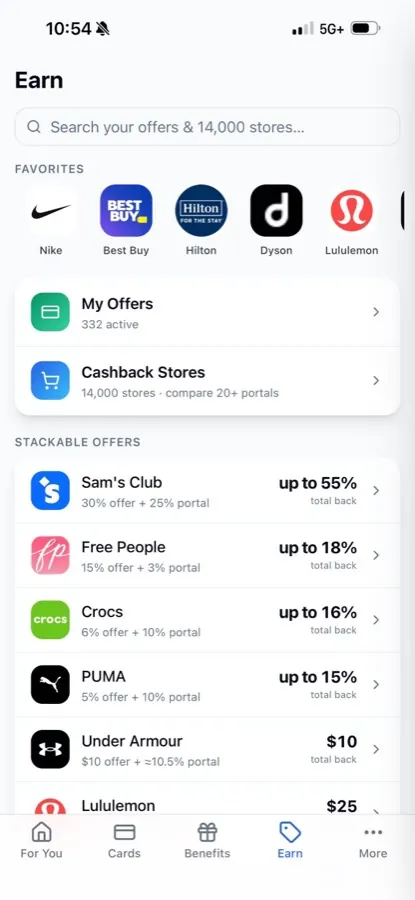
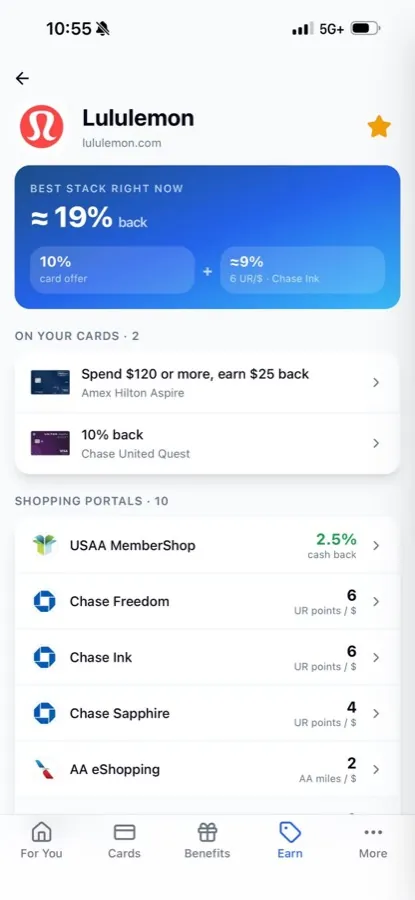
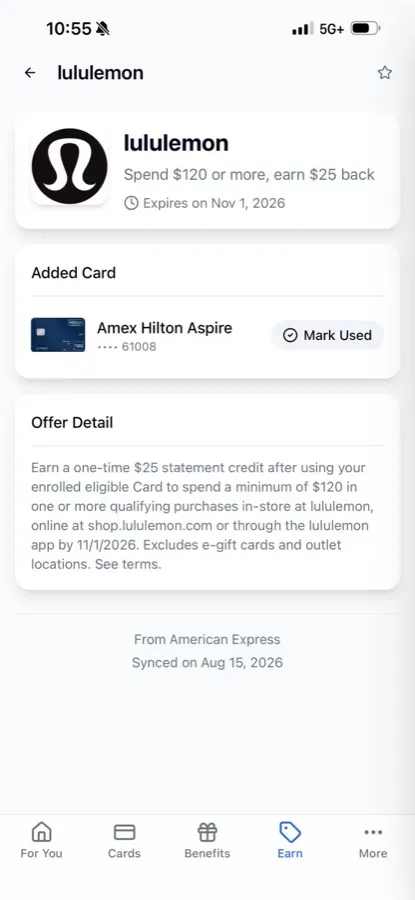
Earn home → merchant page → offer detail. The Stackable list is computed from the offers on your own cards — everyone’s looks different.
The Earn tab is the main entrance to the whole system. A single search box covers thousands of stores, each one comparing 10+ portals at today’s rates. Pin the stores you actually shop — Nike, Best Buy, Hilton — and live rates are one tap away.
The real time-saver is the Stackable offers section. The app automatically pairs the offers synced from your cards with portal rates: a 30% Sam’s Club offer colliding with a 25% portal rate adds up to as much as 55% back; Under Armour is a $10 offer stacked on a roughly 10.5% portal. The list is built entirely from your own wallet — out of every active offer on your cards, which ones stack and for how much is computed and ranked for you. Glance at it before you buy.
Open any merchant and the page leads with “Best stack right now,” broken into its parts. For Lululemon: a 10% offer on a Chase Freedom card, plus 6 UR/$ from the Chase Freedom portal. Note the ≈ sign in front of points-portal numbers — 6 UR points are not 6 cents, so the app converts them at 1.5¢ per point into roughly 9%, putting points and cash on the same scale. You can change the valuations in settings and every number follows.
Below that sits the store’s full portal list — USAA MemberShop’s 2.5% cash, three Chase portals paying UR, AA eShopping paying miles — sorted by effective value. Then “On your cards”: the offers you already hold that work at this store. Open one to see the full terms, the expiration date, and which card (down to the last four digits) it lives on; tap Mark Used after redeeming and it leaves your active list. These offers sync from Amex and Chase, and the detail page shows when they last synced.
The website: compare 10+ cash-back portals across thousands of stores — no app required
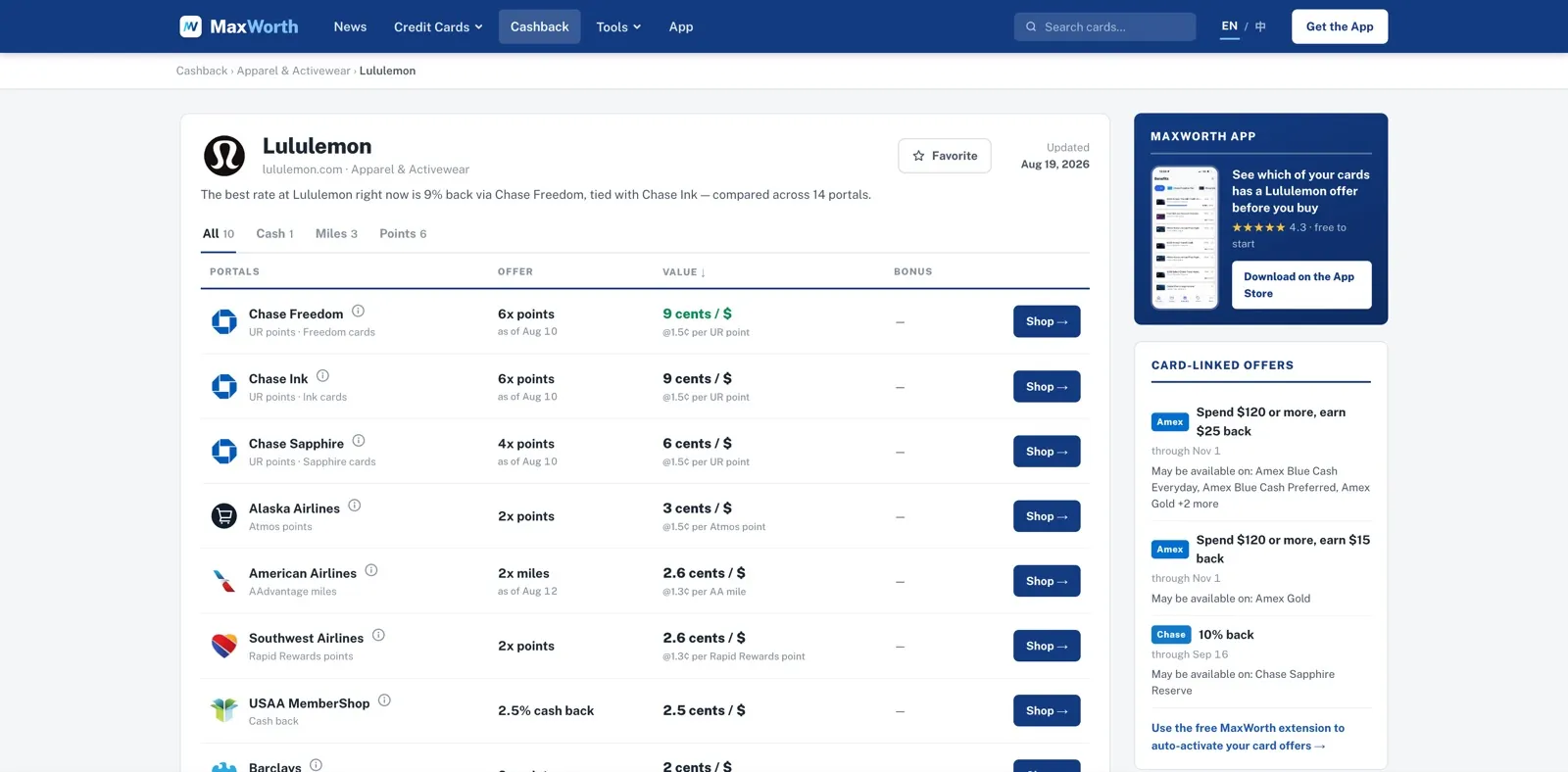
The same data is fully open on the web: maxworth.app/cashback — no sign-up, nothing to install. Every store gets a page with 10+ major portals in one table, filterable by Cash / Miles / Points.
The most useful column is Value. The portal industry’s oldest problem is units that don’t compare: “6x points” here, “2.5% cash back” there, “2x miles” next door — which is best is anyone’s guess. We convert every row to cents / $: Chase Freedom’s 6x UR at 1.5¢ becomes 9 cents/$, USAA’s 2.5% cash is 2.5 cents/$, AA’s 2x miles at 1.3¢ is 2.6 cents/$. With one unit, “which portal should I click through” finally becomes a sortable question. Every row is dated, and rates are re-checked daily against each portal’s public listing.
The right side of the page adds two more things: the card-linked offers currently running at this store (with the cards they may appear on — “May be available on: Amex Gold”), and a comparison of related stores. Even without a MaxWorth account, this one page is enough to price out the whole order.
The MaxWorth Chrome extension: the moment you check out
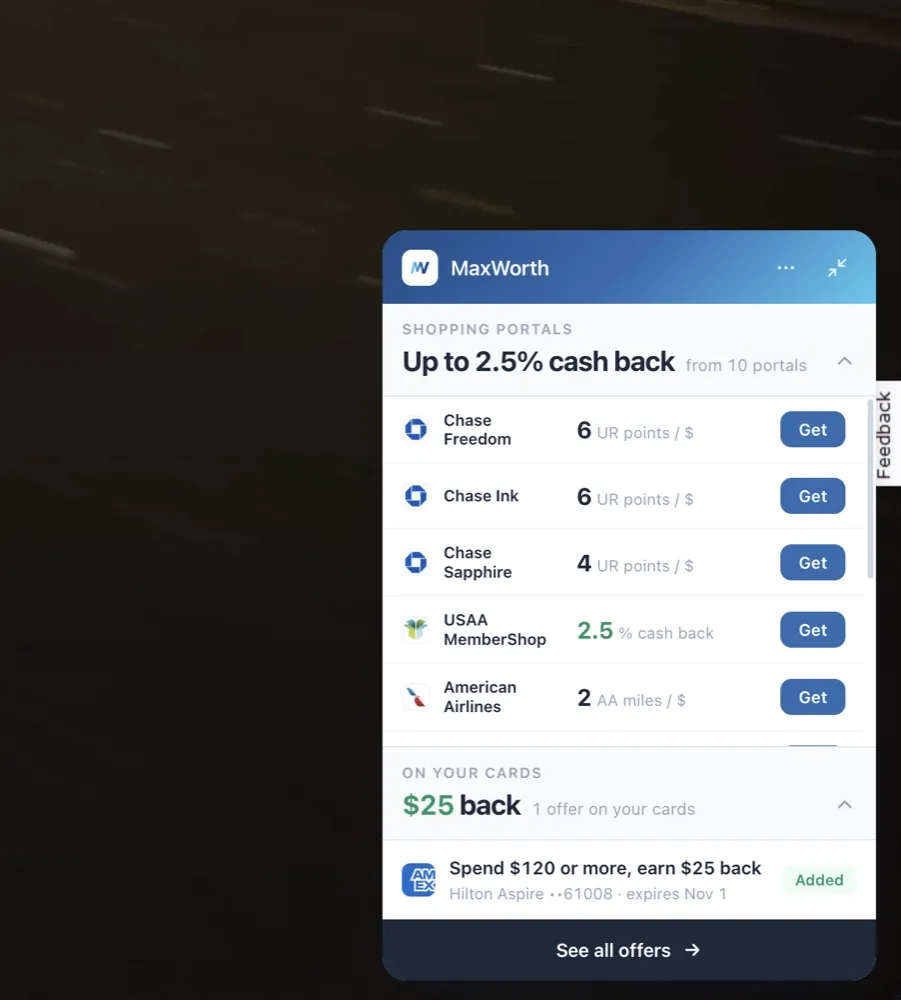
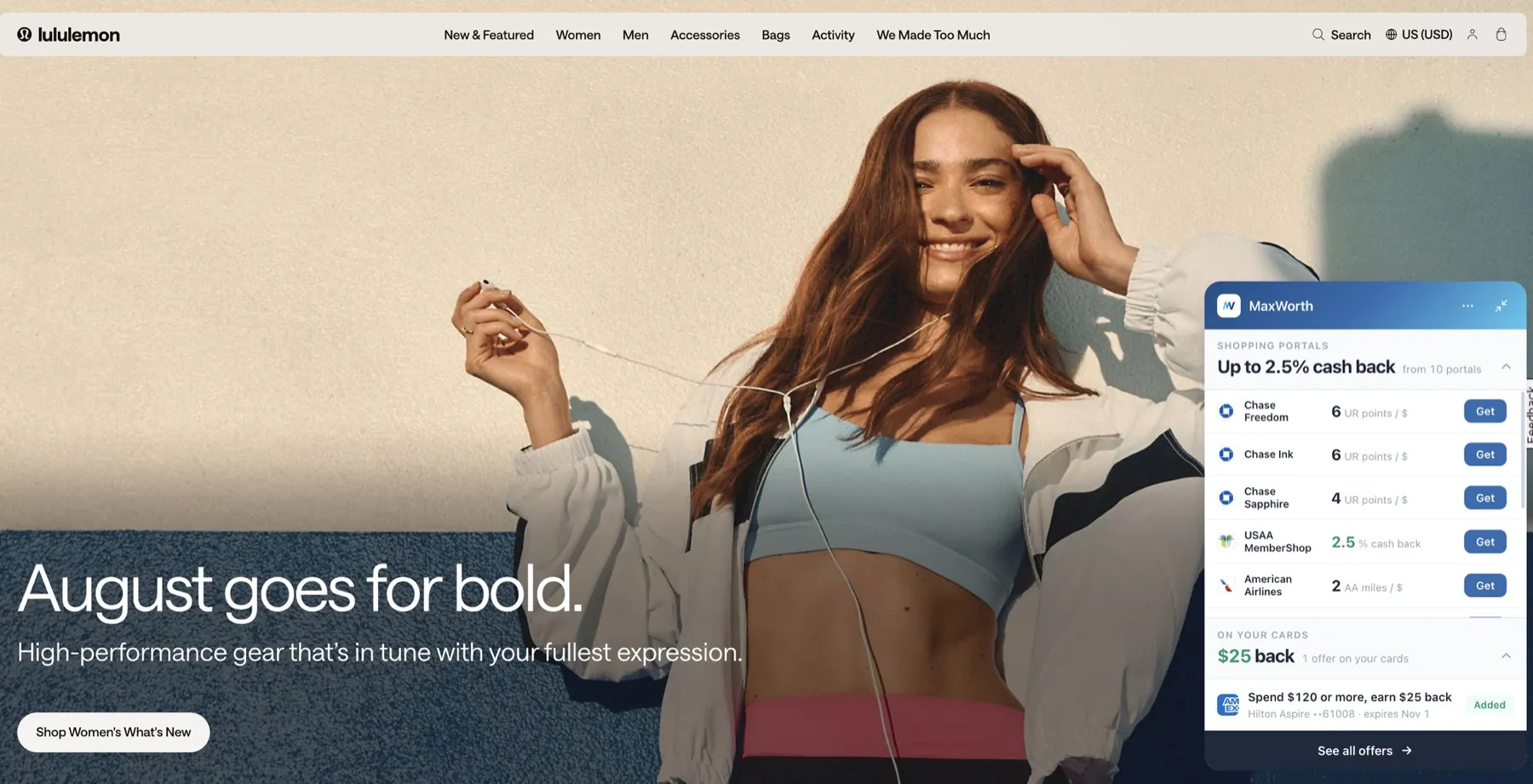
The extension panel: portal rates with one-click Get buttons, and your card offers showing their Added status.
The first two surfaces wait for you to look things up. The Chrome extension flips the direction: you open a store’s website, and it shows up on its own. Browse lululemon.com and a panel appears in the corner — the top half is the portal comparison, same data as the app, each row with a Get button that jumps you through with cash back tracking; the bottom half is “On your cards.” In the screenshot, “Spend $120 or more, earn $25 back” sits on a Hilton Aspire ending in 61008, already marked Added. In the last second before checkout, you don’t need to remember anything — the money you’re owed is sitting in the corner of the screen.
The extension has one more high-frequency job: bulk-activating offers on the Amex and Chase websites. Bank offer lists want a click per offer, and dozens of clicks add up; the extension activates all of them at once on the bank page you’re already logged into. Note where this happens — on the bank’s own website. MaxWorth never asks for or touches your bank password. That’s been the architecture from day one.
Labor Day is coming — ready for it?
Three surfaces, one dataset
| Moment | Surface | What it solves |
|---|---|---|
| Before heading out / a big order | iPhone app | Best stack, offer management, favorite stores |
| Quick lookups, sharing with friends | maxworth.app | 10+ portals compared with no account, points and cash in one unit |
| Mid-purchase | Chrome extension | Automatic reminders, one-click jump, bulk offer activation |
Behind all three runs one pipeline: thousands of stores times 10+ portals, scraped and verified daily; Amex and Chase offers synced to your account through the extension; point valuations calibrated regularly and overridable with your own. Whichever surface you’re on, the numbers come from the same place.
On privacy, one rule: MaxWorth never asks for your bank username or password and never reads your transactions. Offer syncing and activation happen on your bank’s own pages, in your own session. Your credentials only ever go to your bank.
FAQ
Can I really earn a card-linked offer and portal cash back on the same purchase?
Yes. The offer tracks your card’s spend at that merchant; the portal tracks the order you started from its link. The two systems don’t interfere. Click through the portal, pay with the card that carries the offer, and both post.
How is a points portal’s “≈9%” calculated?
6 UR points per dollar times a 1.5¢-per-point valuation = 9 cents per dollar, roughly 9%. The ≈ sign is there because point value depends on how you redeem. MaxWorth uses published default valuations (UR at 1.5¢, AA miles at 1.3¢, and so on), and you can set your own in the app — every number recalculates.
Does MaxWorth need my bank login?
No, never. Offer syncing and bulk activation happen on the bank’s own website, in the session you’re already logged into. Your credentials only ever go to your bank, and MaxWorth doesn’t read your transactions.
What does this cost?
The website is completely free and open. The app is free to start, and the extension is a free install. Some advanced features live behind the app’s subscription.
Rates and offers shown reflect real data from the day of the screenshots (August 2026) and change over time. Always confirm the live numbers on the portal or bank page before you buy.
Frequently Asked Questions
Can I really earn a card-linked offer and portal cash back on the same purchase?
Yes. The offer tracks your card's spend at that merchant; the portal tracks the order you started from its link. The two systems don't interfere. Click through the portal, pay with the card that carries the offer, and both post.
How is a points portal's "≈9%" calculated?
6 UR points per dollar times a 1.5¢-per-point valuation = 9 cents per dollar, roughly 9%. The ≈ sign is there because point value depends on how you redeem. MaxWorth uses published default valuations (UR at 1.5¢, AA miles at 1.3¢, and so on), and you can set your own in the app — every number recalculates.
Does MaxWorth need my bank login?
No, never. Offer syncing and bulk activation happen on the bank's own website, in the session you're already logged into. Your credentials only ever go to your bank, and MaxWorth doesn't read your transactions.
What does this cost?
The website is completely free and open. The app is free to start, and the extension is a free install. Some advanced features live behind the app's subscription.